Apply Template
Reference documentation for using the Ivanti Neurons for ITSM Apply Template action
Written By Support Channel
Last updated Over 1 year ago
Overview of the Apply Template action
The Apply Template action allows you to apply predefined Templates to records within Ivanti Neurons for ITSM using the Templates API.
Understanding the Apply Template action
The Apply Template action is used to apply a configured template to a record within a business object such as Incident. Templates in Ivanti are created by Administrators and typically include default values for key fields, such as category, priority, assigned team, or description.
Neurons for ISM System - Select the Ivanti Neurons for ITSM system that the schema will be retrieved from.
Business Object – Specify the exact name of the business object. For example: Incident
Template – The exact name of the Template as defined in the Ivanti environment.
Unique Key - The unique identifier of the record the action will run against. (RecId)
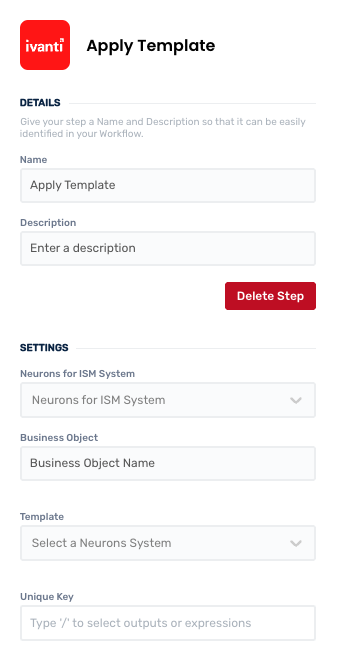
Working with Apply Template action
The Apply Template action is especially useful in workflows where records need to follow a specific structure or predefined configuration.
Create and manage Apply Template actions
Add a Apply Template action
Add the action
Use the following steps to add the action to a workflow.
How to add an action to a workflow
How to add an action to a workflow
Click the ‘plus’ symbol on the workflow path at the point you want to insert the action. This opens the action menu slide-over.
Either:
Search for the action using the Search field above the actions in the menu.
Locate a Recently Used action in the top section of the menu.
Navigate to the action within menu: Core actions are listed under Actions, while Plugin actions are contained within their associated integration.
Select the desired action to insert it. This reveals the action’s configuration panel.
Use the Name field to name the action. This can help users to understand your workflow at a glance. (optional)
Use the Description field to add information describing the action. This can help users wanting to understand how your workflow functions (optional).
Configure the action
Use the following steps to configure the action.
Set values for the Neurons for ITSM System, Business Object, Quick Action and Unique Key.
Click back in the main view to hide the slide-over.
Delete a Apply Template action
Use the following steps to remove the action from your workflow:
How to remove an action from a workflow
How to remove an action from a workflow
Access the workflow in draft mode to edit it.
Either:
hover your mouse cursor over the action, and then click the red cross that appears over the top-right corner of the action to delete it. Or:
click on the action to open the action slide-over. Click the red 'Delete Step’ button to remove the action from your workflow.
Click Publish in the top-right to commit your changes.
Take care when deleting an action to also remove any logic using its outputs: workflow steps may function incorrectly or break if they attempt to evaluate an output of a deleted action.
Was this helpful?
Still need help? Share an idea