Modify date/time
Reference documentation for using the Modify date/time expression
Written By Ben Lehmann
Last updated Over 1 year ago
Description
The Modify Date/Time expression adjusts a given date/time value by adding or subtracting a specific time interval and will return a new, modified date/time.
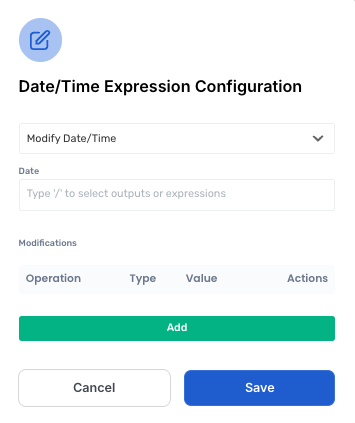
Using the modifications, we break down how the date/time will be changed and by how much they are changed:
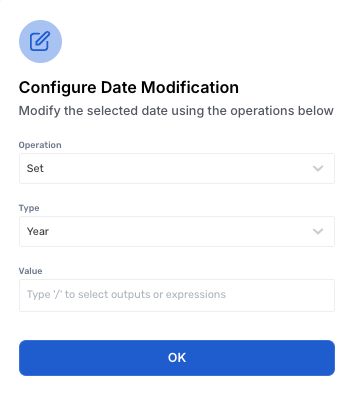
Operation
Set - Change a part (the Type) of the Date/Time to the Value provided.
Add - Add the Value provided to the part (the Type) of the Date/Time.
Subtract - Subtract the Value provided from the part (the Type) of the Date/Time.
Type
The part of the date/time that the modification will change
Value
The amount of adjustment applied to the the selected part of the date
Comments
Months are zero based. This means January is considered to be month 0, February is month 1 etc. This follows the Javascript convention and simplifies mathematical operations on date/time values. (For example, see MDN documentation Date..SetMonth)
To modify the day of the month, chose
Dateas the type to be modified. (As in, ‘What’s the date, today?’)Providing an empty or invalid date/time will make the expression result in error.
Multiple modifications can be applied within a single expression. This can even be the same modification.
Was this helpful?
Still need help? Share an idea