Go To
Reference documentation for using the Go To action
Written By Support Channel
Last updated Over 1 year ago
Overview of the Go To action
The Go To action allows a workflow to jump from its current step to another defined step in the flow. This allows for advanced branching, loopbacks, and conditional navigation without duplicating logic.
Understanding the Go To action
The Go To action lets you redirect the execution path of your workflow to another predefined step. It acts like a jump, enabling you to bypass sections of a workflow or return to a specific action and continue from that point.
Select an Action
Choose the step in the workflow to jump to when this action runs.
Run Limit
Set the maximum number of times this action can be executed during a single workflow run up to 10 times.
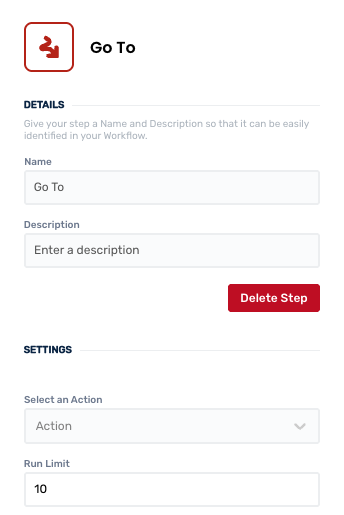
Working with the Go To action
This action is especially powerful when used with expressions or conditions. The action does not process or return any data of its own, but simply reroutes the workflow execution.
You must chose from the Select an Action dropdown, which sets the destination action the workflow will continue from once the Go To action is reached.
⚠️ Caution
Be mindful that creating circular references or jumping backward inappropriately may lead to unintended looping behaviour or workflow failures.
Create and manage Go To actions
Add a Go To action
Add the action
Use the following steps to add the action to a workflow.
How to add an action to a workflow
How to add an action to a workflow
Click the ‘plus’ symbol on the workflow path at the point you want to insert the action. This opens the action menu slide-over.
Either:
Search for the action using the Search field above the actions in the menu.
Locate a Recently Used action in the top section of the menu.
Navigate to the action within menu: Core actions are listed under Actions, while Plugin actions are contained within their associated integration.
Select the desired action to insert it. This reveals the action’s configuration panel.
Use the Name field to name the action. This can help users to understand your workflow at a glance. (optional)
Use the Description field to add information describing the action. This can help users wanting to understand how your workflow functions. (optional)
Configure the action
Use the following steps to configure the action.
Select Select an Action and Run Limit
Click back in the main view to hide the slide-over.
Delete a Go To action
Use the following steps to remove the action from your workflow:
How to remove an action from a workflow
How to remove an action from a workflow
Access the workflow in draft mode to edit it.
Either:
hover your mouse cursor over the action, and then click the red cross that appears over the top-right corner of the action to delete it. Or:
click on the action to open the action slide-over. Click the red 'Delete Step’ button to remove the action from your workflow.
Click Publish in the top-right to commit your changes.
Take care when deleting an action to also remove any logic using its outputs: workflow steps may function incorrectly or break if they attempt to evaluate an output of a deleted action.
Was this helpful?
Still need help? Share an idea