Update Card Carousel
Reference documentation for using the Web Client Update Card Carousel action
Written By Support Channel
Last updated Over 1 year ago
Overview of the Update Card Carousel action
The Update Card Carousel action allows you to modify/change the content or card in an existing carousel sent to Web Chat. This is particularly useful for reflecting changes in status, responding to user input, or dynamically modifying the card content based on workflow progress, without requiring a whole new carousel to be sent to the chat stream.
Understanding the Update Card Carousel action
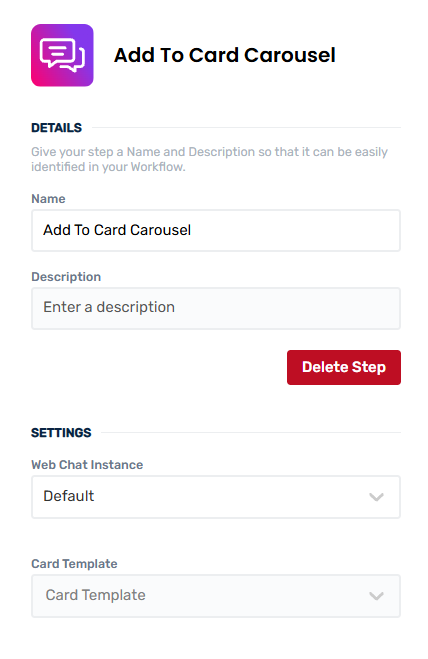
The Update Card Carousel action modifies a card in a carousel that has already been shown to a user. To perform this update, the action needs the following:
Parameters
Web Chat Instance - Select the Web Chat instance where the card will be sent
User Email - Enter the email address for the user who should receive the carousel update. This must be a valid user for the selected chat instance.
Card Template - Choose the Adaptive Card template to be used. See Card Editor for information on card templates.
Card Carousel To Update - An existing Show Card Carousel action to update.
Card Index - The position of the card you want to update within the carousel, starting from 0. This means the first card is index 0, the second is 1 etc.
Card Data - Provide the data needed to populate dynamic elements of the card. These values map to the placeholders or data fields defined in your chosen card template. For example:
Title: "Approval #1234"
Status: "Pending”
Outputs
Card Index - The index of the card currently displayed in the web chat client
Working with Update Card Carousel action
The action doesn’t restrict you to using same card or values as the previous card: when updating a card, you may choose a different template with a new layout or content. The values you provide only need to match your chosen template, not the card template being replaced.
A Update Card Carousel is primarily used to modify card content or the card layout for a card that was previously sent to a card carousel. Instead of posting a new message, the original card is updated in place. There are no action outputs from the Update Card Carousel action as it the update happens immediately.
The Update Card Carousel applies to Carousels that have been displayed in chat. The staging carousel held off screen cannot be updated until it is published to the web chat.
Create and manage Update Card Carousel actions
Add an Update Card Carousel action
Use the following steps to add the action to your workflow.
How to add an action to a workflow
How to add an action to a workflow
Click the ‘plus’ symbol on the workflow path at the point you want to insert the action. This opens the action menu slide-over.
Either:
Search for the action using the Search field above the actions in the menu.
Locate a Recently Used action in the top section of the menu.
Navigate to the action within the menu: Core actions are listed under Actions, while Plugin actions are contained within their associated integration.
Select the desired action to insert it. This reveals the action’s configuration panel.
Use the Name field to name the action. This helps users to understand your workflow at a glance. (optional)
Use the Description field to add information describing the action. This helps users wanting to understand how your workflow functions. (optional)
Configure the action
Use the following steps to configure the action
Set values for the Web Client Instance, User Email, Card Template, Card Carousel To Update and Card Index.
Set Card Data values for fields generated from the card template, if present. Required fields must have values entered.
Click back in the main view to hide the slide-over.
Delete an Update Card Carousel action
Use the following steps to remove the action from your workflow.
How to remove an action from a workflow
How to remove an action from a workflow
Access the workflow in draft mode to edit it.
Either:
hover your mouse cursor over the action, and then click the red cross that appears over the top-right corner of the action to delete it. Or:
click on the action to open the action slide-over. Click the red 'Delete Step’ button to remove the action from your workflow.
Click Publish in the top-right to commit your changes.
Take care when deleting an action to also remove any logic using its outputs: workflow steps may function incorrectly or break if they attempt to evaluate an output of a deleted action.
Was this helpful?
Still need help? Share an idea